Workout Stats
I’ve used a few different workout tracking apps over the years. I never found one that did exactly what I wanted. They all worked fine, but often had features I didn’t want to use getting in my way, or just became large and slow when all I want is to track my progress and maybe analyze the data later.
I’ve also tracked workouts with paper. I had a couple years of handwritten logs in various notebooks and loose sheets of paper covering different time periods. I liked flipping through them to see progress and always thought it’d be cool to actually analyze the data. But my logging was pretty haphazard and I often switch up the exercises I do to keep it interesting. I don’t always follow a set program, otherwise I get bored and stop working out completely.
I didn’t want to use a spreadsheet, as spreadsheet data entry on mobile sucks. I hate having to use the keyboard on mobile. When I’m working out I want tracking to be as easy and quick as possible.
I’ve had it in the back of my mind for a long time that I should just build a simple tracking app for my own use. But I spend all day writing code, so it was hard to want to continue during off hours. Eventually I caved and started a mobile app, then abandoned it because it was taking too much time. Later, I created a PWA, which is what I now use to track my workouts.
What it is
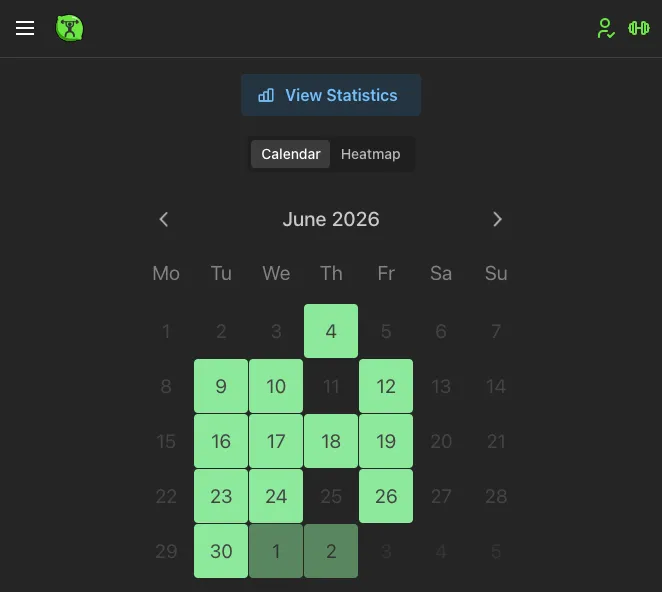
Workout Stats is a simple offline-first workout tracking app. Start a workout, add exercises, log sets as you go, finish when you’re done. Everything stays on your device unless you choose to export it.
That’s it, really. I didn’t set out to build a product for other people. I made it for myself.
I think we’re entering an era of personal apps built with AI coding tools. It’s getting much easier to throw together something that works for your specific wants and needs rather than settling for an app that tries to be everything for everyone.
Reducing friction
The main thing I optimized for is speed of entry. I don’t want to be trying to enter a bunch of numbers on my phone’s keyboard when I’m out of breath. A few design decisions came out of that:
Single taps over keyboard. I use this almost exclusively on my phone, and I hate pulling up the on-screen keyboard to type a single number. Reps are adjusted with +/- buttons.
Duplicate everything. You can duplicate a whole workout, individual sets, or supersets with a single tap. I tend to do similar workouts but switch things up enough that I don’t always want to create templates. So I just duplicate a recent one and adjust. Templates are there too if you want them.
Rest timer with a chime. I zone out between sets and lose track of time. A configurable timer with a sound cue works well for me. Set it to 60 or 90 seconds and forget about it until you hear the chime.
Screen stays on. The app requests a wake lock during an active session so your phone doesn’t sleep mid-set. I usually log my set and step away during rest. I don’t want to keep unlocking my phone. Even now the wake lock doesn’t always behave correctly, something I’m still looking into but it’s better than nothing at the moment.
Offline-first
There should be little to no waiting around for an app to sync data or talk to a server. Waiting is friction, and friction makes me not want to bother with tracking. The workout comes first. Tracking is important but it needs to not get in the way of actually doing the work.
Early on in development I lost about six months of workout data. On Android, when your device’s storage runs low, it may automatically clear data it considers temporary, including a browser’s IndexedDB. That was a fun surprise.
That experience made import/export and backup even more of a priority. You can export a ZIP of CSV files anytime, or sync to an Excel sheet in OneDrive. The Excel integration was mostly an experiment to see how spreadsheet export would work, but it’s there and actually kind of convenient. I’m considering adding other spreadsheet provider integrations in the future.
The tech
I chose React + Vite + Mantine mainly because of familiarity. I knew I could build it relatively quickly, and I started this project pre-AI-tools so that mattered even more. I’ve built in React Native before, but even with a hybrid stack there’s a lot more friction developing straight mobile. And then you have to deal with app stores, which are a pain in themselves. Deploying to the web is still miles easier.
IndexedDB via Dexie was the natural choice for an offline-first web app. Client-generated UUIDs act as primary keys so records created offline can sync later without needing a round trip to allocate IDs. If you log on separate devices you can merge the data.
The optional backend runs on Payload CMS with MongoDB. I was already familiar with Payload from a few other projects, and picking the stack I’d most recently been working in got rid of the analysis paralysis that had kept me from starting. I’d spent a long time thinking about building a simple tracking app. I even have a half-finished React Native version sitting in a repo somewhere. I didn’t actually start building until I forced myself to just pick the technology and go.
What I learned
The hardest part was starting. I’m a developer in my day job, so sometimes it’s hard to be motivated to take programming into my free time, even though I enjoy it. It can lead to burnout doing the same thing all day. Something I’ve struggled with over the last couple years.
If I started over today with AI coding tools it would be much easier to try a different stack, even one I’m not completely familiar with. I’d probably keep the same frontend but might go with a lighter backend for the sync piece. Though I don’t really intend the backend to be used by anyone other than myself, so it’s fine.
What’s next
When I think of things to make the app easier or things I want during a workout I add them to a list. Right now it does everything I need, but I’d like to expand the analytics. There’s a mood log at the end of each workout (some simple emojis for how you feel) that doesn’t have a view yet. I’m still brainstorming what to do with that data.
Try it
The app is live at wstats.addlime.com. Feel free to use it. I use it myself and have a couple years of my own data in it, so I don’t intend to break anything. But no guarantees. If you find it useful, back up every once in a while.
That’s it. See ya.